Lenzic
Best Optical Clinic Software in 2026: Buyer’s Checklist Before You Book a Demo
Judge the best optical clinic software with an 8-point checklist before the demo: cloud vs desktop, and the path from intake to invoice.
If you are looking for the best optical clinic software, feature catalogs are a weak test. What survives daily work is the patient path: booking, intake, exam, prescription, gallery sale, and settlement. The winner is the system that finishes that path without spreadsheets and chat apps. See a live demo first and score vendors with this checklist.
What optical clinic software should actually do
Optical clinic software is not a generic medical chart. It should speed reception, build the doctor queue, record the exam with standard optical fields, hand the prescription to the gallery without retyping, pull a frame and lens from stock, and close the invoice with payment status. Any loop left outside the system becomes delay, remakes, and lost history.
A sound workflow is one story: the patient arrives, the Rx is finalized, the order is built, settlement is recorded. Managers should see how many exams convert to sales—not only how many invoices were printed.
Booking and the front-desk queue sit on that same path. If WhatsApp is still your booking channel, see the move in Optometry clinic appointments: from WhatsApp to online.
For a station-by-station map of one working day—from desk to settlement—keep From reception to exam to invoice beside this checklist.
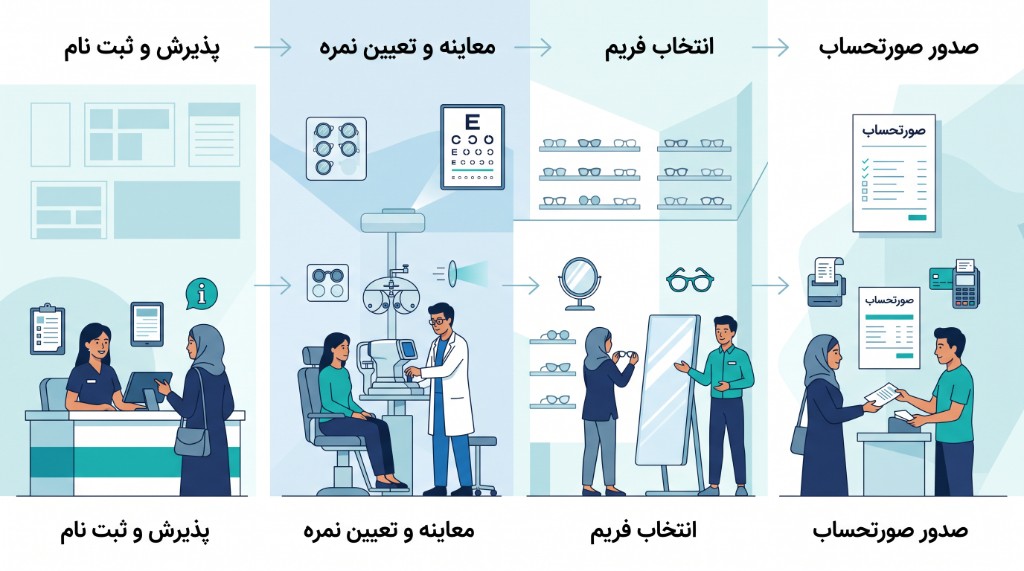
The same chain is unpacked in from doctor RX to gallery invoice.
Optical/gallery software vs eye-clinic EMR vs generic accounting
A general clinic EMR usually covers appointments and notes, but not SPH, CYL, axis, ADD, or lens orders. Eyewear accounting is strong on goods, stock, and invoices, but weak on exams and prescriptions. Optical clinic software must keep both layers on one record: clinical and retail.
If you run a clinic and a gallery on two separate tools, powers get retyped and history fragments. The right buy is one system from intake to sale—not a pile of half-related apps. The deeper category split is in the clinic software buyer’s guide.
Cloud or desktop? A decision test for clinics and galleries
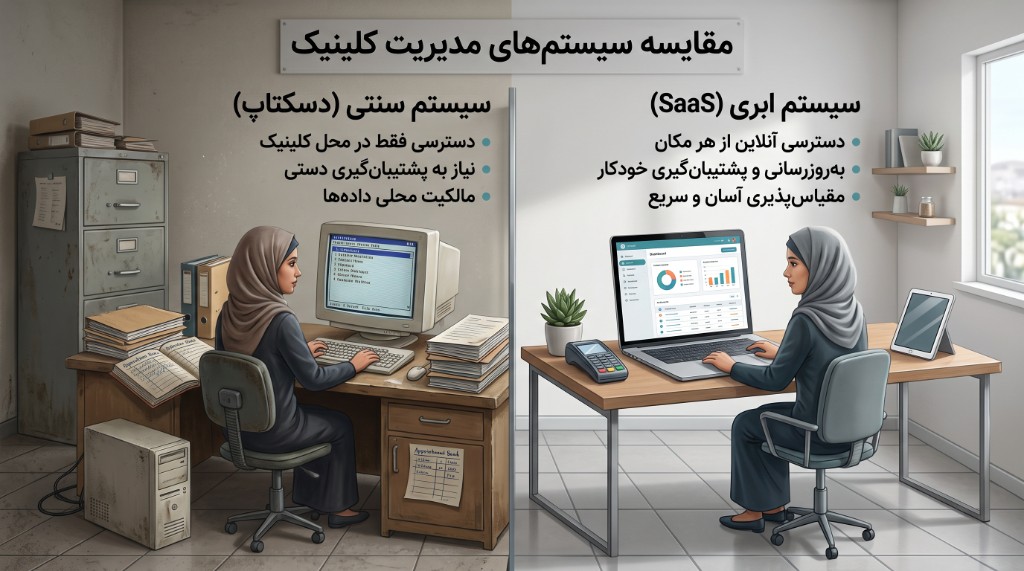
Desktop means install on one or more office PCs, dependence on those machines, and often manual updates and backups. Cloud means sign-in from several stations or branches, updates without a reinstall, and server-side backups. When reception, doctor, and gallery work at the same time, multi-user access matters more than a hardware lock on a single PC.
A practical test: if reception’s computer fails tomorrow, can the doctor and sales continue from another station? If not, take the desktop risk seriously. Cloud alone is not enough; roles and sessions still need to be controlled.
If reception, doctor, and sales all need the same cloud system, dig into the clinic-plus-gallery call in Cloud software for optical clinic and eyewear gallery.
Buyer’s checklist: 8 criteria before you book a demo
Print these eight items and mark them in every demo. Software that postpones half of them will postpone them in daily work too.
If cutting repeat booking calls is high on your list, pressure-test the patient link/QR criterion in Clinic online booking with QR.
Criterion 1, standard Rx entry: SPH, CYL, axis, ADD, and distance/near paths should be required fields—not a free-text box.
Criterion 2, scheduling and intake: registration, doctor queue, and presence status should live in the same system.
Criterion 3, gallery and sales: Rx handoff to frame and lens selection and invoicing, without rewriting powers.
Criterion 4, management reports: exam-to-order conversion, low stock, patient balances, and daily sales—live, not a weekly spreadsheet.
Criterion 5, role security: reception, doctor, sales, and admin should not share one login.
Criterion 6, real support: response time, role-based training, and a named onboarding owner.
Criterion 7, clear pricing: setup and annual renewal stated separately so capital and operating budgets stay distinct.
Criterion 8, data migration: how patients, prior Rxs, and opening stock move, and how source-file quality affects the result.

Ask us these 8 points in a Lenzic demo. If a vendor only shows slides and will not run one fictional patient from appointment to invoice, end the comparison there.
Common mistakes when choosing optical clinic software
The first mistake is buying on setup price alone. A few remakes a month repay “cheap” software—against you. Second, picking a generic medical system without optical modules. Third, skipping training; even a strong product fails without role-based onboarding. Fourth, locking into a local install with no backup or second-branch plan. Fifth, scoring feature lists instead of one real workflow.
How Lenzic maps to the checklist
Lenzic is built for optometry clinics and eyewear galleries in one cloud. Reception builds the queue, doctors record an optical Rx, sales sees the same prescription and closes the invoice, and managers follow inventory and balances on that record. Deployment is cloud: no install and no lock on a single PC. Pricing is a setup fee plus annual renewal so purchase and ongoing support stay visible.
Do not judge this on a brochure. In the demo, walk the same eight criteria: one appointment, one Rx, one gallery order, one settlement. If that path is short and understandable, the software matches daily work. Power conversion and vertex distance are covered in lens power conversion.
Prepare for the demo
Before the call, bring a sample Rx with cylinder and ADD, one in-stock frame and one custom lens order, and two questions on roles and end-of-day reports. Ask every vendor how the Rx reaches the invoice, how current data is imported, and where work stops if the network or one station fails.
After the demo, review plans or send a leftover question from the contact page. When you are ready for a live walkthrough, request a demo from the homepage and keep this checklist as the scorecard. The best optical clinic software is the one your team can use tomorrow to take one patient to an invoice without a notebook or a chat thread.