Lenzic
Patient chart opens at check-in—not at booking
Why reserving an appointment should not open the full patient chart—verify chart-at-check-in in a live optometry clinic software demo.
Picture a busy front desk: three WhatsApp threads asking for tomorrow’s slot, two “do you have anything at four?”, and a walk-in at the counter. If every reserved appointment instantly becomes a full patient chart, the desk fills with half-finished files—names without exams, exams without presence, and notes nobody trusts by afternoon.
This article is for clinic owners and practice managers—not retail shoppers. It isolates one operational buying criterion that foreign vendor sites rarely teach as a headline: reserve the slot first; open the full chart when the patient is present.
Ready to see the path live? Start from getlenzic.com and request a free demo.
Broader checklist: Optical clinic software checklist.
Booking chaos to online scheduling: Appointments from WhatsApp to online.
The real problem: opening the full chart at booking
Teams often mean well: “They booked, so let’s open the chart so tomorrow is ready.” In practice, three frictions show up:
- Half-built charts: the slot moves or no-shows; the incomplete file still clutters queues.
- Status fog: it is unclear whether the patient is “booked,” “checked in,” or just a name on a list.
- Re-work on visit day: reception re-checks everything because yesterday’s file may not be trustworthy.
This is not a clinical claim. It is front-desk operations. The right software question is: when does the full chart open?—not only “do you have a chart module?”
Reserved appointment ≠ opened chart
Keep the separation simple:
- Appointment reserved: a definite time on the calendar; patient or desk knows when to arrive.
- Check-in / presence: the patient is here; today’s status is clear.
- Full chart opens: from this point, exam—and later gallery/invoice if needed—has a clean starting line.
Locked product fact (verify in demo): an appointment can be reserved ahead of time, but the full patient chart does not open until check-in/presence. Ask to see that path live—not on a slide.
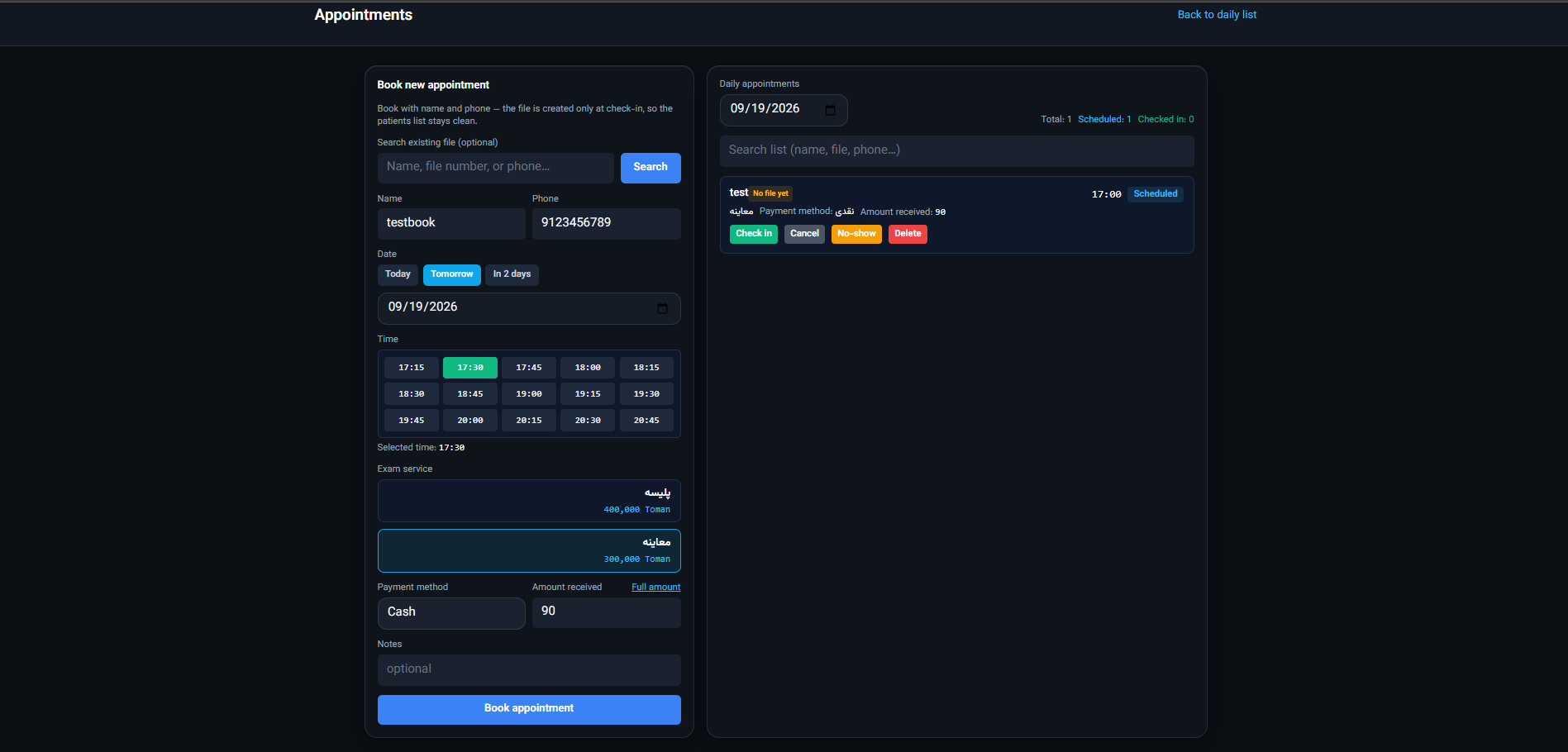
Why it helps: a busy desk does not spawn a full chart for every “tomorrow at four?” message. The clinician queue is meaningful when someone has arrived—not when a chat thread still holds a maybe.
If the vendor only narrates and never walks booking → check-in → chart open, mark it and do not treat description as delivery.
Clinic scene: before and after presence
Before presence (booking only):
Reception sees three appointments tomorrow. Contact details and times are enough. There is no need to pre-open yesterday’s Rx fields or draft exam notes “just in case.”
At check-in:
The patient arrives. Status becomes present. The full chart is available for the exam path—and, when relevant, gallery sale—under one patient identity.
If they do not arrive:
The appointment closes or moves without leaving a half chart on the clinician queue. End of day, the desk knows who came and who did not—without hunting chat history.
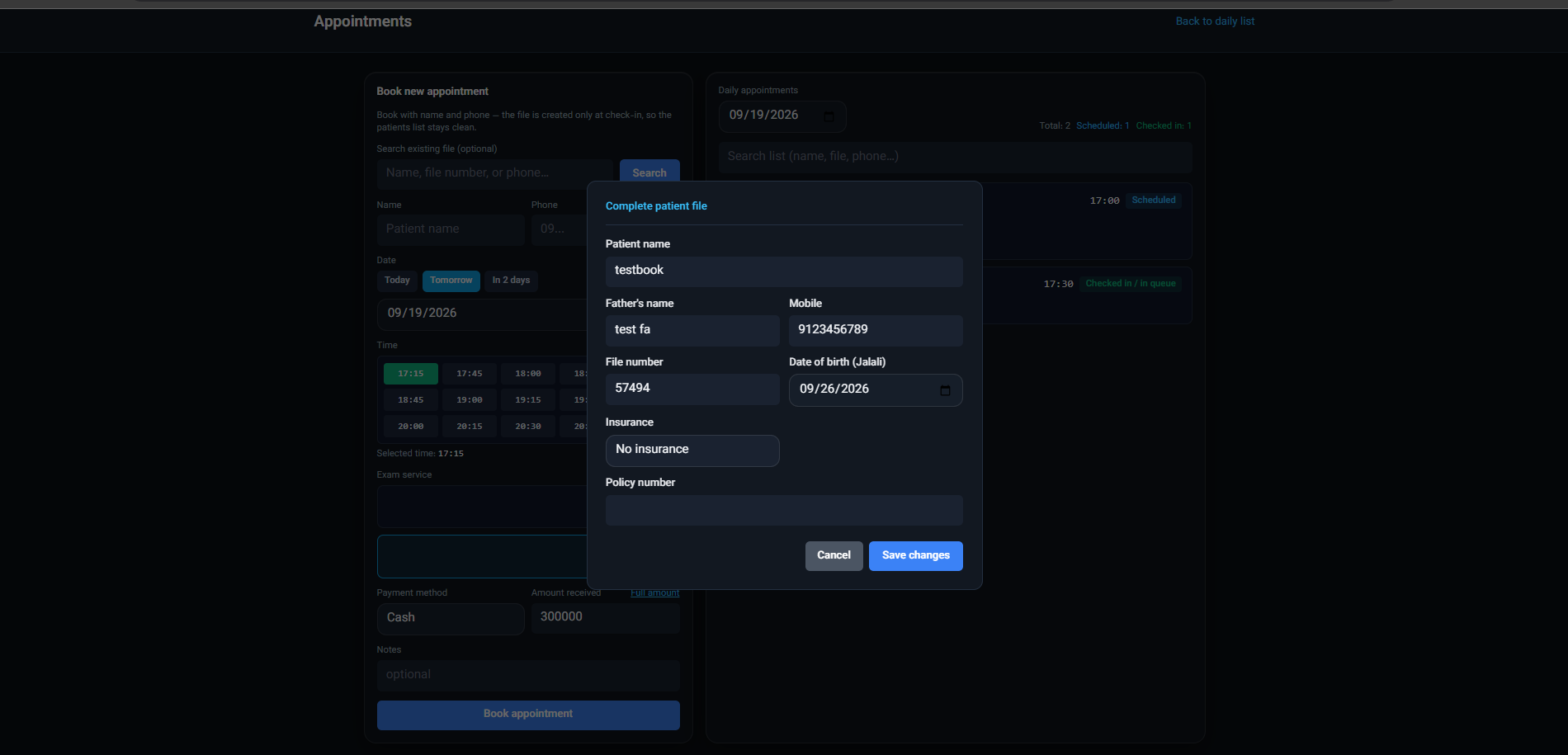
This is the same story as the appointments supporting post (S2): first get booking out of chat chaos; then ask when the chart opens. Without that second question, you only changed the channel and kept the file mess.
Busy desk: three concrete scenarios
Scenario 1 — chat booking, chart opened early:
Yesterday the patient booked on WhatsApp. Reception opened the full chart “to be ready.” Today they do not arrive. The name lingers on the clinician queue; the next person cannot tell who is actually present.
Scenario 2 — clean reserve, clear presence:
The appointment holds time and contact only. In the morning the patient arrives, check-in is recorded, and the full chart becomes available for exam from that point. If they do not come, the slot closes without a half-built file.
Scenario 3 — multiple roles or stations:
Reception at one desk, clinician at another. Without a shared presence status, each person carries a different “today’s list” in their head. Software helps when presence is one source of truth—and the full chart is tied to that truth.
Replay these three with your own sample data in the demo. If the vendor only shows an “appointments module” slide, you have not seen the scenario.
Why foreign vendors rarely teach this as a buyer criterion
US and UK/EU incumbents publicly lead with EHR/PM, optical inventory, claims/payer stories, or regional compliance. Almost everyone mentions online booking. Almost none teach “chart opens at check-in” as an explicit demo checklist item.
Cloud challengers are often closest on exam→invoice storytelling. Differentiate by making check-in as the gate a question you bring to every demo—and by pairing it with WhatsApp→booking realities for non-US desks, which US payer pages rarely address.
We are not copying US VSP or UK GOS lead stories. We own operational criteria that travel: traceable booking, chart at presence, one day flow.
What to verify in a demo
Write these four questions before the call:
- Where is the appointment created—reception, patient link, or both?
- From reserve to presence, when does the full chart open? (verify in demo)
- If the patient no-shows or reschedules, what happens to chart status and the clinician queue?
- After check-in, does the path continue into exam and, if needed, gallery without re-keying?
Question 4 bridges to the full-day flow article: Reception to exam to invoice. That post is about roles and continuous flow; it is not a duplicate of the existing prescription-to-invoice optical workflow.
Request a free demo — in the message, ask: “Show booking → check-in → chart open live.”
Expensive mistakes after you buy
- Assuming “appointments module” equals a presence flow: feature lists are not paths.
- Leaving charts open for chronic no-shows: queues get noisy; trust in data drops.
- Mixing WhatsApp with the system without a rule: if booking still lives in chat, fix S2 first, then F1.
- Magical “zero no-show” promises: the right metric is clear status—not eliminating absence.
No invented conversion rates or market-share stats here. Your criterion is a live demo with your own scenario.
How this fits the cluster
This is a supporting post, not a replacement for the buyer’s checklist.
When self-serve volume rises via QR, the same “reserve now, chart at check-in” rule matters even more—see clinic online booking with QR.
- Pillar checklist: Optical clinic software checklist
- Appointments (S2): WhatsApp to online
- Clinic + gallery one cloud (S1): Cloud clinic + eyewear gallery
Plans: #plans. Contact: /contact.
Bottom line and next step
If the full chart opens at booking, half-finished files and status fog usually return to the desk. The cleaner path: reserve the slot; record presence; open the full chart from check-in onward—and verify that live.
Request a demo: home · Plans: #plans · Contact: /contact.
One line for your team: Start the demo with “When does the chart open?”—not a feature tour.